

Table of Contents
- Introduction
- Why AI Tools Are Becoming Essential for Students
- How to Choose the Right AI Tool
- ChatGPT – Your Everyday AI Assistant
- Google Gemini – Best for Research
- Claude – Ideal for Writing and Analysis
- Perplexity AI – Smarter Web Research
- Notion AI – Organize Your Academic Life
- Tips to Use AI Responsibly
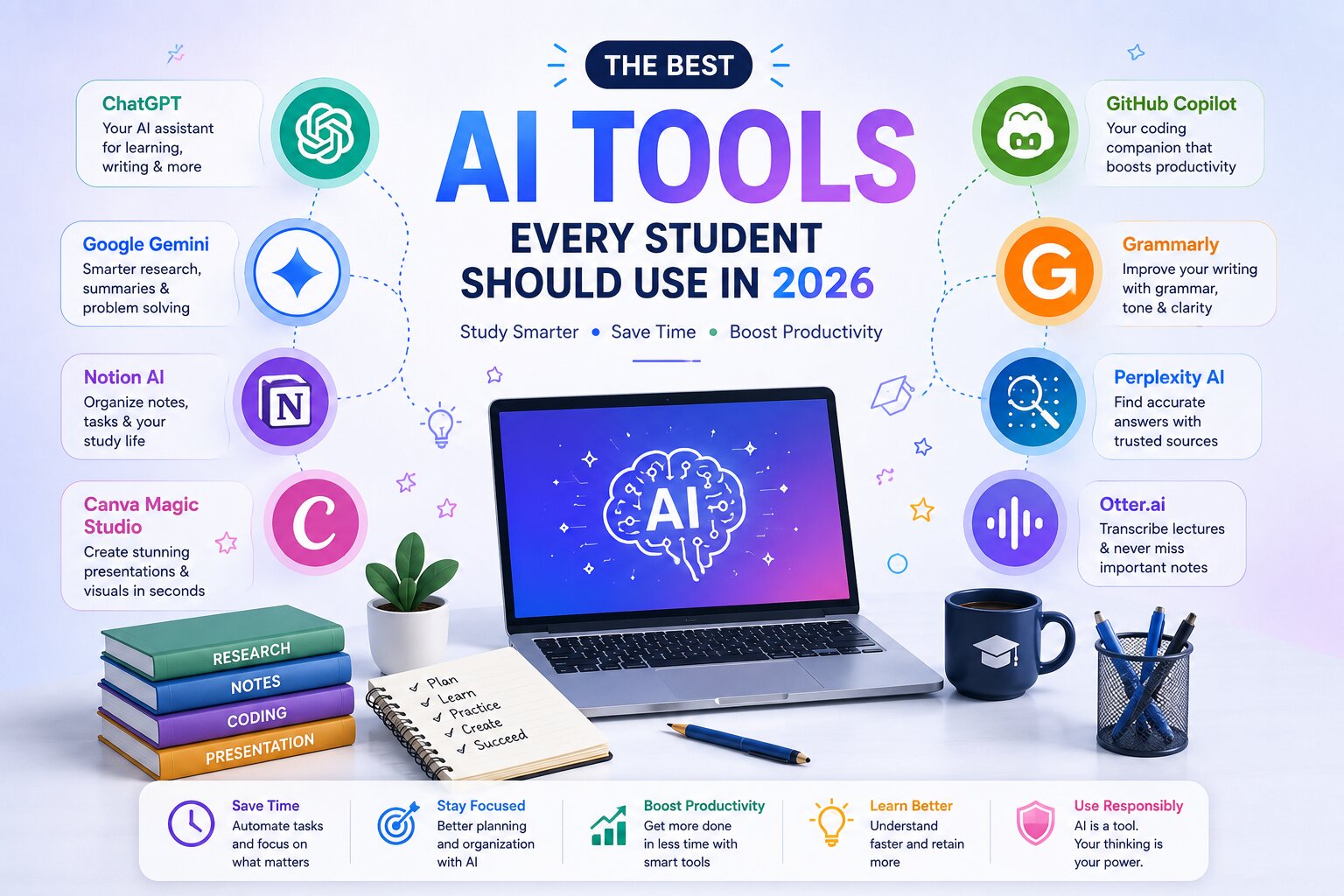
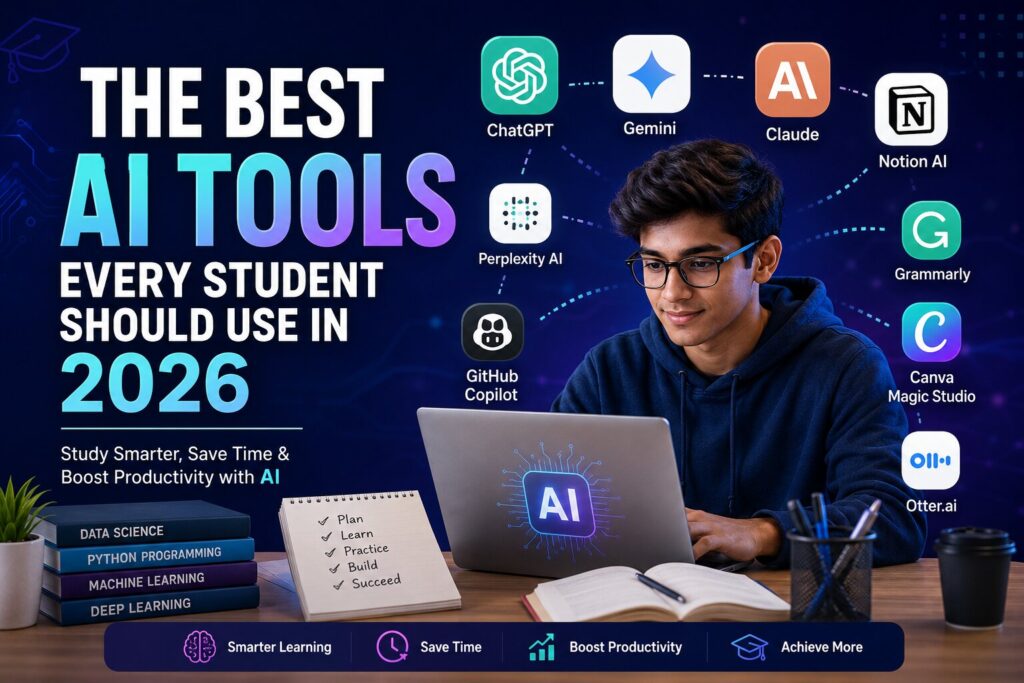
The Best AI Tools Every Student Must Use in 2026
Artificial Intelligence has revolutionized the way students research & handle other academic responsibilities. Instead of being an emerging field in the world of education, AI has already become a necessity in 2026. No matter what kind of assignments you prepare, how you learn programming, organize notes and even present ideas, there are AI tools that will help you to become more productive and effective.
But AI must not replace your own thoughts and reasoning abilities. The most successful students treat AI tools as assistants rather than cheats that will do the job for you. But when you use AI properly, it becomes a source of additional motivation and creativity.
This article will introduce you to some of the best AI tools for students in 2026.
Why AI-Based Software Is Getting Essential for Students
The current generation of students has been facing many difficulties. Projects have become more research-based, presentations demand better visualization skills, coding projects are becoming harder, and balancing studying with extracurricular activities is not easy.
AI software makes a lot of these tasks easier without any loss of education when applied properly. One does not need to spend many hours browsing through hundreds of websites; it becomes easy to grasp knowledge, make summaries of long texts, prepare plans for studying, and get explanations according to one's skill level.
Some of the most important advantages are:
- Fast research process
- Time management
- Quality writing
- Productivity increase
- Personalized learning
- Coding help
- Creative brainstorming
- Language development
Moreover, many universities even promote responsible use of AI-based software by teaching students to check the reliability of information provided by AI algorithms.
AI Tools Selection Guide
All AI tools are not alike in functionality. Prior to selecting any tool, try to identify your requirements.
For assistance with the comprehension of challenging ideas, you should consider an AI assistant. If your requirements include the organization of your notes and tasks, you should consider productivity-based AI software. Students working on coding assignments should focus on AI coding assistants, whereas for presentation creation, AI design platforms can be considered.
An effective AI tool must have:
- Accuracy of results
- User-friendly interface
- Cost-effective price
- Privacy-oriented approach
- Updates
- Compatibility with multiple devices
Instead of downloading all the available AI apps, select some reliable tools which will meet your academic requirements.
1. ChatGPT - The Daily AI Study Buddy
Of all the AI tools out there today, ChatGPT stands out as one of the most multi-purpose tools for students.
It can help students understand complex topics in any subject such as mathematics, science, computer science, business studies, literature, and history. You can get it to generate sample questions, brainstorm projects, review your essays, summarize lectures, understand coding line by line and much more.
Best Uses
- Understanding difficult topics
- Brainstorming assignments
- Help with coding
- Improving essays
- Studying planning
- Language learning
- Making resume
- Preparing interviews
- Advantages
- User-friendly
- Multi-subject support
- Great explanations
- Quick response
- Accessible on all devices
Limitations :
AI is known to sometimes provide inaccurate data and hence, students need to be careful about checking facts. It serves better as an additional study tool than a textbook or teacher substitute.
2. Google Gemini AI - Best for Researchers
Research is often a time-consuming process. Google Gemini is a research tool that assists students in gathering information more effectively through the application of AI technology together with Google’s powerful search network.
It excels at summarizing long texts, topic comparisons, creating notes for studies, and locating sources.
Engineers, scientists, and managers can benefit from the usage of Gemini since it deals with technical topics very well in addition to having connections to Google's productivity suite.
Best Uses
- Research assignments
- Text summarization
- Brainstorming
- Learning complex subjects
- Creating presentations
Advantages
- Very good web integration
- Good factual explanations
- Supports multiple file formats
- Collaborative use
Disadvantages
- Crosscheck sources before using them in your academic work.
3. Claude – Great for Essay Writing and Analyzing Long Documents
Claude is popular because it can analyze long documents and produce high-quality writing and structure.
Students, especially those dealing with academic assignments such as reports or review papers, benefit from the clear organization of information that Claude provides.
Unlike other tools, which generate text, Claude not only generates it but also makes the text easier to read, fills logical gaps, and finds an optimal structure.
Good Uses
- Academic writing
- Research summary
- Report preparation
- Essay editing
- Analysis of long documents
Pros
- High-quality writing
- Natural text
- Good with long documents
- Simple to edit
Cons
- Despite good writing quality, students still need to personalize the text and add their understanding.
4. Perplexity AI – Smart Internet Searches
The main problem that students have is distinguishing whether the information found on the internet is true.
Perplexity AI solves this problem by offering not only an answer generated by artificial intelligence but also links to sources, which allows verifying the information.
There is no need to switch between numerous tabs in order to receive summarized answers.
Best Use Cases
- Literature review
- Quick research
- Fact check
- Current events
- Technical explanation
Pros
- Information from reliable sources
- Fast information gathering
- Easily readable interface
- Very useful in academic research
Cons
- For serious research, one still needs to refer to official journals and textbooks.
5. Notion AI – Manage Your Academic Routine
Productivity is not only about working fast but being organized as well.
Notion AI provides all four mentioned tools for taking notes, managing tasks, writing documents, and planning projects.
It allows keeping all class notes, assignments, schedules, and plans in one application without opening different apps.
Additional AI features make notes summarizing, brainstorming, and document writing easier.
Best For
- Class notes
- Projects management
- Daily planning
- Revision schedules
- Collaboration with others
Benefits
- User-friendly interface
- Good organization
- AI-based writing
- Compatibility with other platforms
Drawbacks
- Ways of Using AI Responsibly
AI systems are meant to complement but not substitute for learning. Students who depend wholly on AI fail to gain many benefits that can come from learning how to think and solve problems.
6. GitHub Copilot – The Perfect AI Coding Helper
Coding is a vital skill for computer science and engineering students. Whatever your task may be, whether it’s website design, mobile application development, or completion of programming assignments, code creation can sometimes take a lot of time. GitHub Copilot becomes a perfect partner in coding that provides code fragments, completes functions, and even explains existing code.
Rather than looking through multiple forums for syntax or debugging tips, students can utilize GitHub Copilot to accelerate development and learn efficient programming.
Best uses
- Code creation
- Program debugging
- Learning programming languages
- Completing routine coding tasks
- Understanding code
Benefits
- Multiple programming languages support
- Code editor integration
- Increase of coding efficiency
- Learning of programming principles by beginners
Limitations
- Even though GitHub Copilot is extremely helpful for students, one must not accept all its suggestions blindly.
Learning how the code works is much more important than copying it.
7. Grammarly – Boost Your Writing Instantly
Excellent communication is essential in any discipline you pursue. Grammarly uses AI to detect grammatical errors, spelling errors, punctuation errors, and poor sentence structure.
Whatever type of writing task you have, whether it is homework, grant application, research project, or business correspondence, Grammarly will help you write better.
Best for
- Homework corrections
- Essay writing
- Improving resume
- Business correspondence
Benefits
- Immediate grammar correction
- Improved vocabulary suggestions
- Tone detection
- Simple browser extension
Drawbacks
- Grammarly sometimes makes suggestions that might alter your original idea, so you need to verify all suggestions made by the tool.
8. Canva Magic Studio – Professional Presentation Design in Just Minutes
The creation of aesthetically pleasing presentations involved a great deal of graphic design work. Nowadays, Canva's AI-driven Magic Studio has made presentation and poster creation simple.
With Canva's Magic Studio, students can now create templates, eliminate backgrounds, make illustrations, and create professional presentations without spending countless hours on formatting.
Best Uses
- College presentations
- Posters
- Infographics
- Resume design
- Social media creations
Benefits
- User-friendly interface
- Hundreds of templates to choose from
- AI image generation
- Collaboration capabilities
Drawbacks
- Some premium templates and AI features need to be unlocked through a subscription.
9. Gamma AI – Prepare Your Presentation In Less Time
If you need a presentation done in quick time, then Gamma AI is certainly one of the fastest ways to do it. Give it your topic, and it creates an entire presentation for you with headings, images, and other layout elements.
Instead of working on slides for hours, the students get more time to concentrate on the subject matter.
Use Cases
- Class presentations
- Project presentations
- Slides for seminar
- Business proposal
Pros
- Saves lots of time
- Professional slide design
- Easy customizations
- AI-generated visual content
Cons
- Make sure you review the prepared content.
10. NotebookLM – The Personal AI Study Companion
NotebookLM has gained popularity among students since it enables users to upload their own study materials in the form of PDFs, lecture notes, or research papers. It doesn't give generic answers but rather gives its responses according to the uploaded documents.
It is most helpful for preparing exams.
Best Uses
- Exam revision
- Summarization of lecture notes
- Research paper discussion
- Personalized study session
Pros
- Works with your own source
- Summarizes information
- Clarifies complex terms
- Helps save study time
Cons
- It works effectively only with good-quality documents.
11. Otter.ai – Never Miss Important Lecture Notes
Otter.ai does recordings and gives transcripts that help students to pay attention to lectures without taking notes.
The application is especially beneficial for seminar recordings, virtual classes, interviews, and discussion sessions.
Best Uses
- Transcribing lectures
- Making notes for meetings
- Recording of interviews
- Discussions for group projects
Benefits
- Automatic transcription
- Notes are searchable
- Organized notes
- Time saving
12. Microsoft Copilot - AI in Every Day Productivity
This is AI in such well-known products as Word, Excel, PowerPoint and Outlook. It allows students to create summaries of papers, generate spreadsheets, write emails and create presentations in an effective way.
Students who have been using Microsoft 365, will find Copilot particularly useful.
Uses
- Writing documents
- Analyzing spreadsheets
- Writing presentations
- Creating emails
Benefits
- Integration with Microsoft products
- Saving time
- Suitable for academic and business purposes
- Enhancement of the workflow
Drawbacks
- Some functions require specific Microsoft plans.
How to take advantage of AI:
- Use AI to learn concepts rather than get answers.
- Confirm critical information from credible academic sources.
- Bring in your own ideas and examples into assignments.
- Never submit AI-generated material without checking.
- Stick to your school's policies on academic integrity.
Used in an ethical way, AI is one of the most useful companions in learning today.
As a person who creates projects and shares knowledge in technology, Krishpreet also thinks that AI needs to enable students to learn quicker without promoting shortcuts. The true strength lies in blending curiosity, creativity, and proper use of AI in order to solve actual issues.
The Impact of AI on Student Experience in 2026
AI technology is revolutionizing learning through some amazing means. In place of replacing instructors, AI technology is aiding students in learning effectively by offering personalized explanations, feedbacks and interaction-based learning.
Some of the AI trends that will have huge influence on education in the coming years are:
- Personalized learning programs via AI
- Intelligent virtual tutors
- Automated note taking
- Coding education with AI assistance
- Interactive language learning
- Improved accessibility for disabled students
- Enhanced collaboration
- Research assistance
Those students who master using AI technology today will definitely be able to handle future workplaces.
FAQ’s
1. What are some of the best AI tools that students should use in 2026?
Some of the best AI tools include ChatGPT, Google Gemini, Claude, GitHub Copilot, Grammarly, Canva Magic Studio, Perplexity AI, NotebookLM, Gamma AI, Otter.ai, and Microsoft Copilot.
2. Are all AI tools free for students?
While many AI tools are free, premium subscription often offers advanced features. However, the majority of students would be able to do a lot of work even with free tools.
3. Can AI help with improving academic performance?
Yes, it can. Students will be able to increase their productivity, organization skills, ability to research and write papers and learn much more effectively. Nevertheless, students should use AI in order to grasp the concepts better.
4. Which AI tool is the best for coding students?
One of the best coding assistants is GitHub Copilot, while ChatGPT is an amazing tool for explaining various programming principles, debugging and learning new technologies.
5. Is it safe to use AI for homeworks and assignments?
Yes, as long as you follow the rules of your institution concerning academic integrity.
Conclusion
Artificial Intelligence is revolutionizing the process of studying, and those students who start using this technology wisely will have a great advantage. From working on essays and research papers to learning programming and creating presentations, Artificial Intelligence can become a good helper in many aspects of academic life.
The main rule here is to see it not as a way to skip the studying process but as your additional tutor. Try to learn new things, verify information you find, use critical thinking in everything you do. In this case, you will not only save your time but will be able to develop a whole range of useful skills for yourself.
No matter what kind of student you are – a school student, a university one, or a future programmer, you can improve your studying process with the right tools from the field of Artificial Intelligence.
In case if you are interested in the sphere of technology, programming, and web development in particular, do not forget to check out interesting and informative materials on Krishpreet.
One thought on “The Best AI Tools Every Student Should Use in 2026”