

From the very beginning of my Angular journey, I realized that I won't be satisfied with simple tutorial projects or with "Hello World"-type applications. My intention was to create a functional, engaging project, which will not only help me develop new skills but which will also become one of the most impressive items of my portfolio. As a result, my vision turned into reality when I created Stormeyt – a modern weather app which has got a clear interface, live weather data and fun user experience.
Developing Stormeyt meant much more than displaying current temperature for a specific city. This project provided me with great insight on how actual web applications are built, taught me how to connect third-party APIs, design responsive interfaces, solve bugs and overcome other difficulties of developing a complex application.
In this article, I will tell you why I decided to create Stormeyt, what technologies were used during the development process, what obstacles I encountered and what I have learned.
The Concept of Stormeyt
Each developer has his or her own project that takes one outside the comfort zone. For me, it was Stormeyt.
Although weather applications may seem to be rather easy, there are still several things that any frontend developer should know and that are necessary for developing such application. These include fetching live data from APIs, handling asynchronous requests, updating the UI, managing errors, etc.
It is not about making a rather ordinary weather application, which will have only text with simple design, but about creating something modern, fast and appealing. It is supposed to be an application that users will love to use.
This was also about reflecting my style in development.
Planning Before Writing Code
Before opening my code editor, I spent time planning the application.
I listed the features that I wanted the first version of Stormeyt to include:
- Current weather information
- Five-day weather forecast
- Search for cities around the world
- Beautiful weather cards
- Air Quality Index (AQI)
- Sunrise and sunset timings
- Responsive design
- Light and dark mode
- Smooth animations
- Fast loading experience
Having a clear roadmap helped me stay focused during development instead of constantly changing directions.
Choosing Angular
As I intended to enhance my abilities as a frontend developer, Angular was the best fit.
Angular is equipped with an architectural design which makes large scale projects easy to develop. It is due to such features as components, dependency injection, services, routing, and TypeScript integration that make it a good choice for developing large-scale applications.
Initially, Angular seemed hard to grasp owing to numerous things that had to be learned. However, during the Stormeyt project, I came to value its structured design in case of its proper utilization.
It helped me gain a lot of experience in working with components, services, modules, observables, and data binding.
Designing the User Interface
In my opinion, functionality and design need to be complementary.
A lot of apps about the weather have reliable information, yet no good design. I needed Stormeyt to have an up-to-date design and yet be user-friendly.
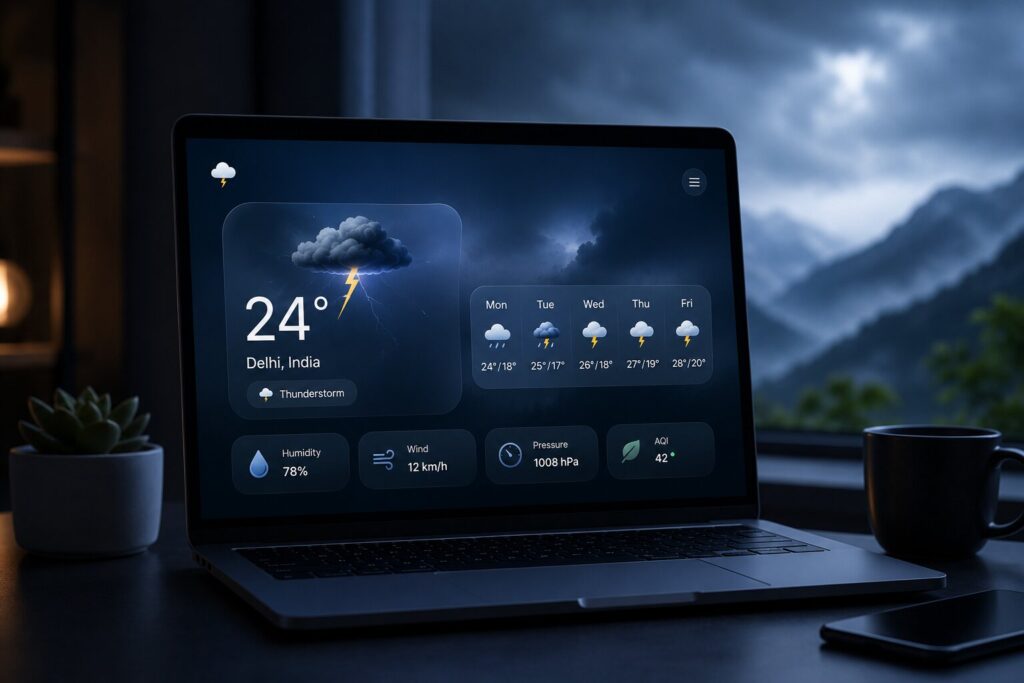
For the design, I decided on a clear glassmorphism-inspired style with light shadows, round cards, smooth animations, and lots of white space. Rather than having everything crowded in one place, I made sure to show the information about the weather in a clear manner.
Mainly, there is a card with weather, where you can see the temperature and the weather itself, along with extra cards showing other information, such as humidity, wind speed, air pressure, AQI, and times of sunrise/sunset.
It all adapts smoothly for desktop, tablet, and mobile devices.
Retrieving Live Weather Data
The coolest part about this project was the implementation of real-world weather API.
Instead of utilizing some mock-up sample data, I wanted to make sure that Stormeyt will give users live and actual weather data.
Every time a user searches for a particular city, Stormeyt will call for weather API to retrieve the data. This will be done through Angular HttpClient which will receive JSON data.
In the process, I learned more about asynchronous operations and dealing with API responses. It was important to learn how to handle loading state and to display data only when it had been successfully retrieved.
Seeing live weather data appear immediately after the search was very cool.
Reusable Components
The ability to develop in components is what makes Angular unique.
Rather than having one giant file that has all the application logic written in it, I split Stormeyt up into several reusable components.
I created different components such as a navigation bar, weather display component, loader, and a footer component. This helped a lot when maintaining the project as every component had its own functionality.
When I needed to enhance any feature, I knew where to find the corresponding code.
Implementation of the Weather Forecast
Only showing the weather information for the current day did not suffice in many cases.
Many people would like to know what kind of weather is expected on the next day or at some point in the following days.
For this, I have introduced a multi-day weather forecast part where the temperature, weather conditions, and corresponding icons are shown.
In order to accomplish this, multiple API calls had to be done, and the information had to be structured in such a way as to present the results.
Responsive Design of the Interface
In today’s world, most people use their mobile devices to access websites.
Due to this reason, responsive design played an important role in the entire development process.
I tested the website Stormeyt on various screen sizes using CSS Grid, Flexbox, and media queries.
The cards become resized, navigation is made responsive to small screens, and the text does not get blurred even without zooming by the user.
Performance Counts
Despite how good your app is, no one is going to use it if it takes ages to load.
As much as I could during the development process, I sought ways to boost performance.
These included minimizing API calls that were not necessary, optimizing the images, organizing CSS files, and reusing the Angular components wherever I could.
Additionally, I took care to ensure that loading states were clear to the user.
Difficulties Encountered
As any real-life development process, Stormeyt also had its share of difficulties.
One of the difficulties that I encountered was comprehending the asynchronous programming logic.
At first, it was not clear why data is not immediately accessible after making an API call.
Studying observables in Angular helped me overcome this difficulty.
The next difficulty was the occurrence of some unexpected issues with the user interface.
For example, sometimes, layout was perfect for desktop but totally ruined on mobile devices.
It also happened that API responses were inconsistent with expectations leading to the absence of necessary or incorrect information.
Rather than being disheartened, I regarded each difficulty as an opportunity to learn.
In retrospect, I believe that debugging was a better teacher than any tutorial could be.
What I've Learned from Stormeyt
Stormeyt was much more than a typical project in my portfolio.
From it, I have learned to:
- Develop well-structured Angular apps
- Use REST APIs in an effective way
- Design reusable components
- Code better TypeScript
- Make websites more responsive
- Catch errors easily
- Debug the frontend problems
- Boost app performance
- Structure projects properly
- Think like a user
Most importantly, it taught me that developing applications helps me to become a better developer very quickly.
Tips For Beginners
If you are just starting out on the development path, you should not wait until you are "ready" to start working on projects.
Projects such as Stormeyt have taught me much more than any number of tutorial videos.
Select a project that is really interesting to you, decompose it into smaller tasks and continue improving it piece by piece.
You will make mistakes, find bugs, and sometimes get stuck—these are all necessary things in becoming a better developer.
There are few better feelings than the feeling of successfully solving a complex problem.
Conclusions
The development process of Stormeyt was an amazing experience in my path of becoming a successful developer. This project pushed me to put aside the theoretical knowledge and implement everything into practice by creating something useful for the public.
What is more, the creation of the app helped me understand that good software is not created instantly. It changes and grows during experiments, troubleshooting, getting feedback from users, and constant improvements.
Stormeyt became my personal milestone in the area of web development that stands for my progress, interests, and passion for creating new applications. In the context of my future research and development work related to artificial intelligence, machine learning, and full-stack development, I will constantly remember the process of Stormeyt creation.
In case you are studying web development right now, there is only one piece of advice for you to follow: start developing. Your first app will definitely not be perfect, but it will push you closer to your goals.
Frequently Asked Questions (FAQs)
1. What is Stormeyt?
Stormeyt is a weather app for modern devices that I have developed using Angular. This app shows real-time weather data, weather forecast for several days, AQI, sunrise and sunset time, and even has a responsive design to use it on a desktop and mobile device.
2. Which technologies have been used to develop Stormeyt?
Stormeyt was developed using Angular, TypeScript, HTML5, CSS3, and OpenWeather API. Moreover, this project has been created using HttpClient from Angular and Git.
3. Why did you choose Angular for this project?
There are many reasons to choose Angular for this project. Firstly, this technology allows creating reusable components, dependency injection, and provides TypeScript support.
4. What problems did you encounter while developing Stormeyt?
Among the major problems were dealing with asynchronous API requests, making the interface responsive, managing errors in the API and improving performance of the application. Coping with the above mentioned problems contributed to my practical experience in web development.
5. What functions are you going to include in Stormeyt in the future?
Among the functions that I am planning to include in the application are automatic location detection, weather alerts, favorite cities, weather map, Progressive Web App (PWA) functions, offline mode and artificial intelligence driven weather predictions.